

How it works
- A shopper reaches your checkout and leaves without paying.
- ChatFlows waits for the time you set.
- ChatFlows checks the checkout again. If they still haven’t paid, your automation sends the message.
- If they pay before then, nothing is sent.
Before you start
- Your store is connected.
- Your WhatsApp number is connected.
- You have an approved WhatsApp template for the reminder. See Template examples for wording.
- Your Shopify checkout asks for a phone number. Without one, ChatFlows can’t reach the shopper.
The shopper hasn’t messaged you, so the first message must be an approved template.
This is a WhatsApp rule, not a ChatFlows one. See the 24-hour rule.
Build the automation
Create an automation
Go to Automations and create a new automation.
Set the trigger
Click the Start Trigger. Choose Shopify as the trigger source, then Cart abandoned as the event.
Choose when to send
In Send after (minutes), enter how long to wait. You can enter 5 to 1,440 minutes (24 hours).
Leave it empty to use 60 minutes.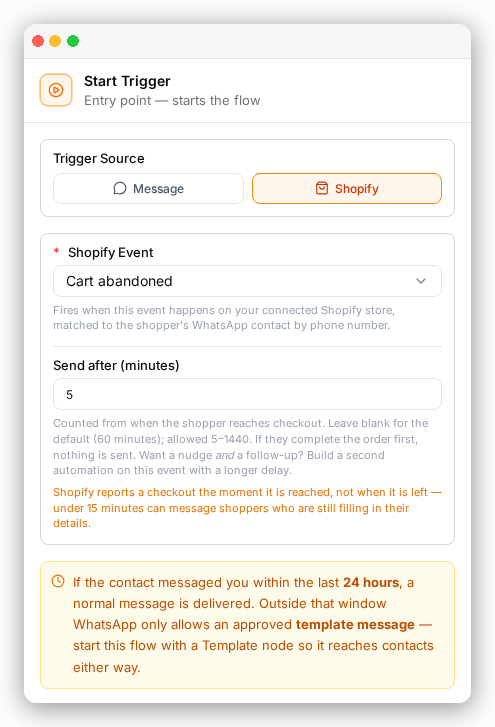
Add your template
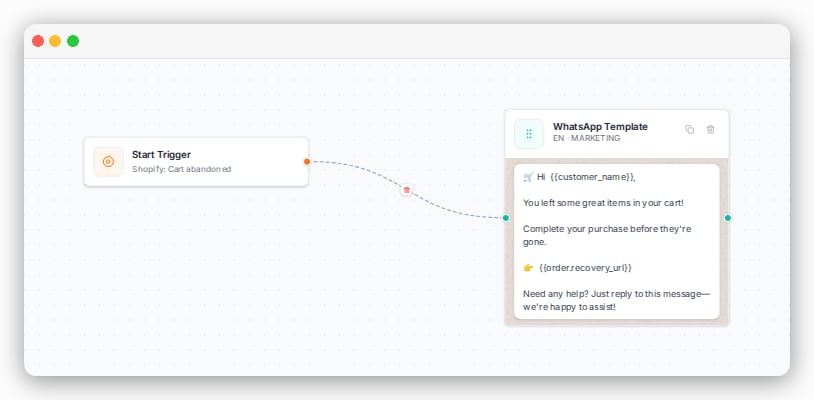
Add a WhatsApp Template step and pick your approved reminder.
Add the cart link
Put
order.recovery_url in the template’s button or text. It takes the shopper back to checkout with their cart still full.Save and turn it on
Save the automation. It runs for every new abandoned cart from now on.
Choosing the wait time
Shopify tells ChatFlows about a checkout as soon as the shopper reaches it, not when they leave. A very short wait can message someone who is still typing their address.- Under 15 minutes is usually too soon.
- 30 to 60 minutes works well for most stores.
Send two reminders
You can send more than one reminder. Make one automation for each reminder, each with its own wait time. For example:- Automation 1: Cart abandoned, send after 20 minutes. A friendly nudge.
- Automation 2: Cart abandoned, send after 720 minutes (12 hours). A last reminder.
How recovery is counted
A cart counts as recovered when it later becomes an order that isn’t cancelled. ChatFlows matches the order to the cart in one of two ways:- the same checkout is paid, or
- the same customer places an order within 7 days.
See your results
The Shopify dashboard shows how many carts were abandoned, how many were recovered, and how many got a reminder.Common questions
Will a shopper who already paid still get a cart reminder?
Will a shopper who already paid still get a cart reminder?
No. ChatFlows checks the checkout again just before sending, so a shopper who has already paid gets nothing.
See How it works.
Can I send cart reminders on SMS or email?
Can I send cart reminders on SMS or email?
No. ChatFlows sends Shopify cart reminders on WhatsApp only, from your connected WhatsApp number. Shoppers are matched by the phone number on their checkout.
Do I need to change my Shopify theme to recover abandoned carts?
Do I need to change my Shopify theme to recover abandoned carts?
No. ChatFlows doesn’t add anything to your storefront or theme. It only reads your store’s checkouts and orders.
Can I put a discount code in my WhatsApp cart reminder?
Can I put a discount code in my WhatsApp cart reminder?
Yes. You can paste a discount code you created in Shopify into your reminder message. ChatFlows doesn’t create discount codes for you.
See Build the automation.
Where to next
Send order updates
Message customers when an order is placed, shipped or delivered.
Order details in your messages
Add the cart total, items and more to your reminder.